Edit visually
Edit APIs in forms, keep your files
A writer fixes one description, and the pull request rewrites the whole file. The editor shows OpenAPI and AsyncAPI as forms and changes only the lines it has to, so the diff is the edit.Saves in place in Chrome and Edge. In other browsers, drop the folder on the page and get the changes as downloads.
- Product owners and writers can change the APIOperations, schemas and examples are edited in forms, without learning the YAML of the standard. What a form doesn't model is shown as raw YAML and written back as it was.
- Diffs that stay smallComments, key order, anchors and quoting stay as they were, so a form edit reviews like a hand edit.
- Your files, on your machineThe editor works on a folder on your computer, with no account and no server. Nothing is sent anywhere unless you press Try it out.
The form, and the diff it leaves
A form per operation, schema, channel and message, with the problems under the fields they belong to, and the YAML beside the form. Here the summary of createShipment was changed and saved: the file differs in that line, and the flow sequence above it, the block scalar below it and the quoting stay. Download the same file to make the edit yourself.
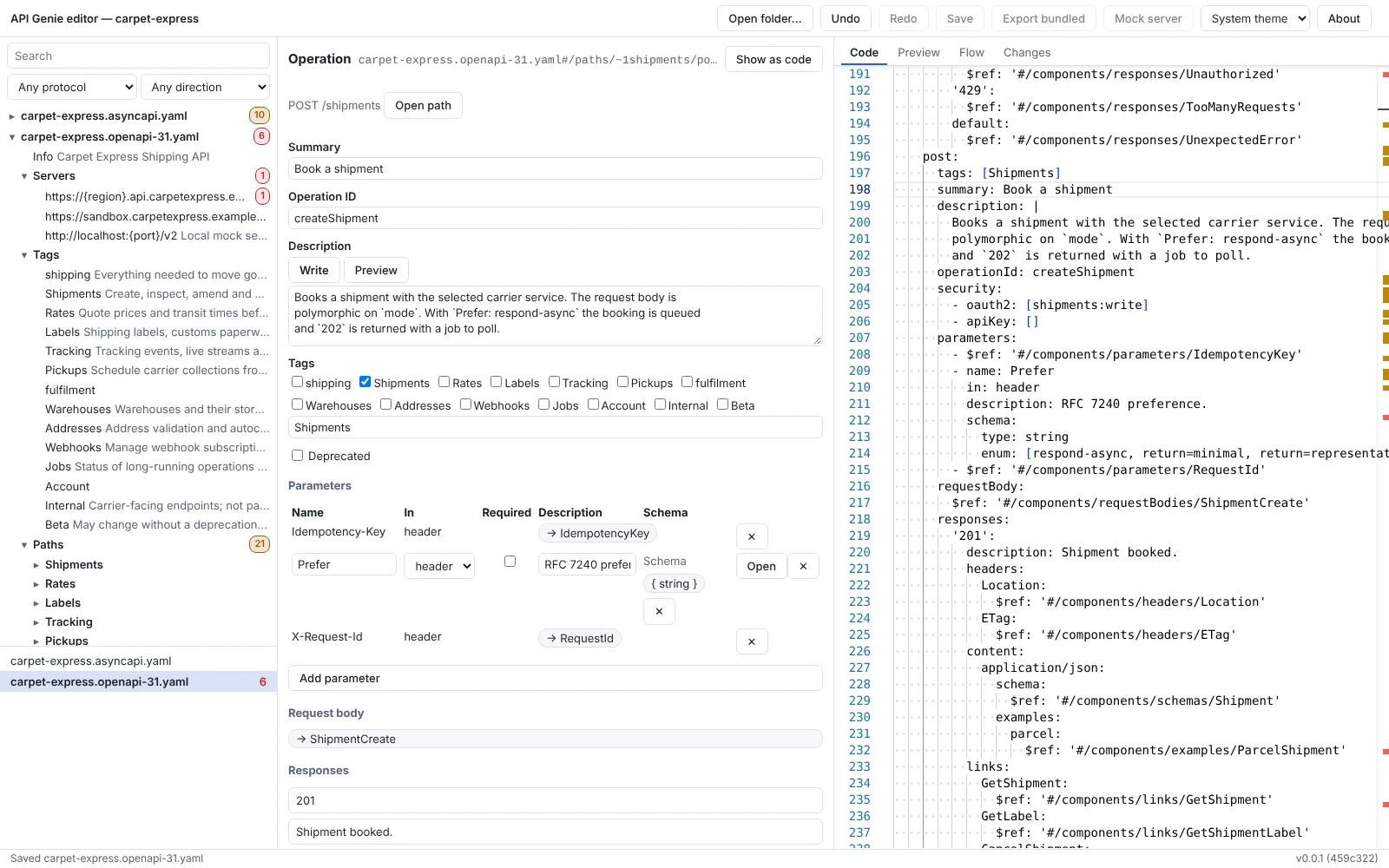 Open the screenshot at full size
$ git diff carpet-express.openapi-31.yaml
@@ -195,7 +195,7 @@
$ref: '#/components/responses/UnexpectedError'
post:
tags: [Shipments]
- summary: Create a shipment
+ summary: Book a shipment
description: |
Books a shipment with the selected carrier service. The request body isWhat it covers
- FormsOpenAPI 3.0 and 3.1, and AsyncAPI 3.0 with Kafka, AMQP, MQTT and WebSocket bindings.
- Schema editorJSON Schemas as a tree, with examples generated from them.
- RefactoringRename, move, extract and inline, across every file of the folder.
- DiagnosticsThe linter rules and your Spectral rulesets, with quick fixes.
- ImportSwagger 2.0, AsyncAPI 2.x and Postman collections.
- Three hostsThe browser today; the desktop app and the VS Code extension from their 1.0.0 releases.
The tool that does it
Step by step
Edit an API in forms: Open a folder of OpenAPI or AsyncAPI files in the editor, change them in forms, and review the change like any other.
Open a folder, make the edit, review the diff
The web editor opens a folder of yours in Chrome or Edge and saves in place; other browsers get the changes as downloads. No account, no server. The desktop app and the VS Code extension follow with their 1.0.0 releases.